
Need to figure out how much mulch, gravel, concrete, or topsoil you need? Don’t guess, calculate it. The Cubic Yard Calculator from Intercalculator gives you instant, accurate volume estimates for any project, large or small.
Whether you’re pouring concrete, filling garden beds, leveling soil, or ordering bulk materials, this tool helps you plan the perfect amount, saving you time, money, and extra trips to the supplier. It converts your measurements into cubic yards, cubic feet, and cubic meters in seconds, handling unit conversions automatically.
From quick DIY landscaping to professional construction jobs, get precise results that make material planning fast, simple, and stress-free.
How to Calculate Cubic Yards: The Basic Formula
Understanding how to calculate cubic yards is essential when working with gravel, mulch, concrete, topsoil, or any other landscaping or construction material sold by volume. It’s not just about multiplying numbers; it’s about getting the right units, using the correct formula, and knowing what shape you’re working with.
Step-by-Step Guide to Using our Cubic Yard Calculator
Using a Cubic Yard Calculator like the one on Intercalculator can save you time, guesswork, and even money. It’s especially helpful when working with bulk materials like gravel, mulch, topsoil, or concrete. Let’s walk through exactly how to use it, step by step.
Choose Your Area Shape
Start by selecting the shape of your project area from the Area Shape dropdown. You’ll see 8 options:
- Rectangle
- Rectangle Border
- Square
- Circle
- Circle Border
- Annulus
- Triangle
- Trapezoid
The calculator dynamically shows input fields that match the shape you choose. For example, Rectangle asks for Length, Width, and Depth, while Trapezoid requests Base 1, Base 2, Height, and Depth.
Enter Dimensions and Units
Next, enter your depth, length, and width (or other values depending on the shape). Each input supports:
- inches (in)
- feet (ft)
- yards (yd)
- centimeters (cm)
- meters (m)
The tool automatically converts everything to feet behind the scenes using a precise unit conversion script. This means you can mix units freely without breaking the calculation.
Set Quantity (Optional)
Working with multiple identical shapes? Just set the Quantity. If you’re building 3 raised beds of the same size, enter “3”, and the calculator will multiply the cubic feet, cubic yards, and cubic meters accordingly.
Add Cost Calculation (Optional)
One powerful feature is the Optional Cost Calculator. Here, you can:
- Choose your currency (like $, €, £, ₹)
- Input the cost per unit (e.g., per yard (yd³), foot (ft³), or meter (m³))
The calculator will multiply your total volume by the rate you provide and show an estimated cost, great for budgeting your landscaping or construction project.
Click “Calculate”
Hit the blue Calculate button. Behind the scenes, the tool applies shape-specific volume formulas, converts all units to feet, then returns:
- Cubic Yards (yd³)
- Cubic Feet (ft³)
- Cubic Meters (m³)
- Optional Total Cost
This output appears in bold text, right below the form, making it easy to read and copy.
View or Copy the Result
Need to share the result? Click the “Copy” button and the full result string, including cubic yards, feet, meters, and cost, will be saved to your clipboard.
Clear and Recalculate
Want to start over? Hit the Clear button to reset all fields and hide advanced sections. You can then change the shape, re-enter your values, and run a fresh calculation.
💡 If you’re working with asphalt driveways or paving projects, you can check out our free Asphalt Calculator for accurate cost and material estimates.
The Core Formula
To calculate cubic yards, you first determine the volume in cubic feet, then convert it. Here’s the standard formula:
That 27 comes from the fact that 1 cubic yard = 27 cubic feet (since 3 feet × 3 feet × 3 feet = 27 ft³).
Why It Pays to Get It Right
I once helped a friend order fill dirt for a patio base. He gave rough estimates and skipped the conversion step, thinking it wouldn’t matter much. In the end, we were short by almost half a yard, and the delivery truck had to make a second trip, which doubled the delivery fee. Since then, I have always calculated using this formula or the Intercalculator cubic yard calculator, which does all the unit conversions and math automatically.
Formula Variations for Different Shapes
While the base formula works for rectangles, other shapes need adjustments:
| Shape | Formula Used (in ft) |
| Square | Side × Side × Depth ÷ 27 |
| Circle | π × (Diameter ÷ 2)² × Depth ÷ 27 |
| Triangle | ½ × Base × Height × Depth ÷ 27 |
| Trapezoid | ½ × (Base1 + Base2) × Height × Depth ÷ 27 |
| Annulus | π × (Outer² − Inner²) ÷ 4 × Depth ÷ 27 |
| Borders | Outer Volume − Inner Volume ÷ 27 |
Each formula still ends with division by 27 to convert the result from cubic feet to cubic yards.
With just a few measurements and the right formula, you can confidently estimate how many cubic yards you need, no surprises, no extra costs, no wasted materials.
Cubic Yards vs. Cubic Feet and Cubic Meters
When it comes to ordering gravel, mulch, concrete, or fill dirt, you’ll often see quantities listed in cubic yards, but sometimes in cubic feet or cubic meters. While they all measure volume, they represent different scales, and mixing them up can lead to expensive mistakes.
Let’s break it down clearly.
What’s the Difference?
Here’s how the three units compare:
| Unit | Symbol | In Feet³ | Description |
| Cubic Yard | yd³ | 27 ft³ | Used in the US for bulk materials |
| Cubic Foot | ft³ | 1 ft³ | Common in DIY and small-scale tasks |
| Cubic Meter | m³ | 35.3147 ft³ | Metric standard, used internationally |
- 1 cubic yard = 27 cubic feet
- 1 cubic meter ≈ 35.3147 cubic feet
- 1 cubic yard ≈ 0.7646 cubic meters
How to Convert
If you already know the volume in one unit and need to convert:
- Cubic feet to cubic yards: divide by 27
- Cubic meters to cubic yards: multiply by 1.30795
- Cubic yards to cubic feet: multiply by 27
- Cubic yards to cubic meters: multiply by 0.7646
These conversion formulas are built into the Intercalculator tool, so you can switch between yd³, ft³, and m³ automatically.
Why This Matters in Real Projects
Volume can feel abstract until it hits your wallet. I once ordered 2 cubic meters of concrete instead of 2 cubic yards, assuming they were roughly equal. The delivery arrived… and only covered about 70% of what I needed. Not only did I have to order again, but I also paid a second delivery charge and lost a full day on-site.
After that, I learned the hard way to double-check unit conversions, especially when working across metric and US customary units.
When to Use Each
- Cubic Yards: Best for ordering bulk materials in the US or Canada (e.g., landscaping, driveways, soil, concrete)
- Cubic Feet: Useful for smaller areas like planter boxes, indoor fills, or when estimating leftover material
- Cubic Meters: Standard in international projects, architecture, engineering, and global shipping
The Intercalculator tool instantly gives you all three units, cubic yards, cubic feet, and cubic meters, so you can plan accurately, order wisely, and never worry about conversion errors again.
Common Shapes: How to Calculate Volume for Each
Not all projects use perfect rectangles. From circular flower beds to sloped concrete forms, different shapes require different volume formulas. Whether you’re working with a rectangle, triangle, circle, or something more complex like a trapezoid or hemisphere, it’s important to apply the correct calculation, especially when converting to cubic yards.
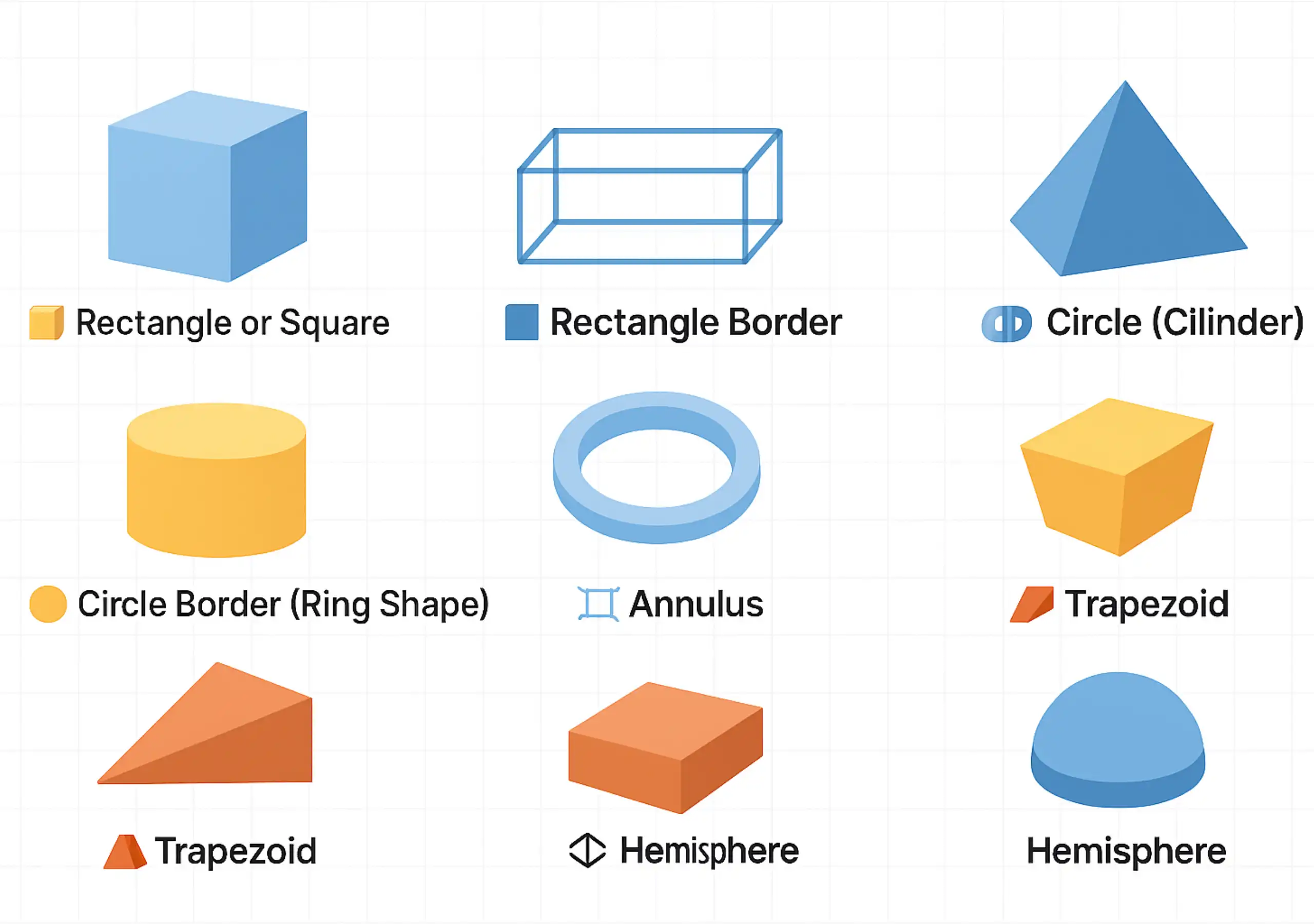
Below are the most common shapes used in landscaping, construction, and material planning, along with their volume formulas (measured in feet, then converted to cubic yards by dividing by 27).
1. Rectangle or Square
Formula:
This is the most common shape. Use it for patios, garden beds, rectangular slabs, or storage bins.
2. Rectangle Border
Formula:
Use this when calculating the volume of a surrounding fill, like the space between two rectangles.
3. Triangle or Triangular Prism
Formula:
Often used in sloped areas, ramps, or triangular raised beds. This formula accounts for the triangular face’s area before applying depth.
4. Circle (Cylinder)
Formula:
Used for round pits, planting beds, and vertical columns. The π ensures precision in the circular area.
5. Circle Border (Ring Shape)
Formula:
Think of this like a donut-shaped area, perfect for tree rings or border landscaping.
6. Annulus
Formula:
Same as Circle Border:
Used for symmetrical hollow circles like wells or irrigation zones.
7. Trapezoid
Formula:
This is ideal for irregular shapes like sloped trenches or non-uniform garden plots.
8. Hemisphere
Formula:
Common in landscaping domes or half-sphere features like mounded topsoil areas.
Volume Formulas for Each Shape
| Shape | Volume Formula (in ft³) |
| Rectangle | L × W × D |
| Square | Side × Side × Depth |
| Rectangle Border | (OL × OW − IL × IW) × D |
| Triangle | ½ × Base × Height × Depth |
| Circle | π × (Diameter ÷ 2)² × Depth |
| Circle Border | π × Depth × (Outer Radius² − Inner Radius²) |
| Annulus | π × Depth × (Outer² − Inner²) |
| Trapezoid | ½ × (Base1 + Base2) × Height × Depth |
| Hemisphere | (2/3) × π × Radius³ |
To convert any result to cubic yards, divide the volume in ft³ by 27.
The Intercalculator tool automatically applies the right formula for you based on the shape you select. It handles π, unit conversions, and even area differences in complex shapes like rectangle borders or annulus, so you don’t need to memorize these equations.
How Many Cubic Yards Do You Need and What Will It Cost?
To find out how many cubic yards you need, follow this formula:
Use the Intercalculator tool to skip the math; just enter your dimensions, and it does the rest.
Example:
- Area: 20 ft × 10 ft
- Depth: 3 inches = 0.25 ft
- Volume: 20 × 10 × 0.25 = 50 ft³
- Cubic Yards = 50 ÷ 27 = 1.85 → Round up to 2 yd³
Cost Estimate:
If gravel is $50 per cubic yard and delivery is $60:
- 2 yd³ × $50 = $100
- Total cost = $160
Tip: Add 5–10% extra for waste or settling.
Need help? Our calculator can also estimate cost; just input your price per yard and currency.
What Does One Cubic Yard Look Like?
A cubic yard is the volume of a cube that’s 1 yard wide, 1 yard long, and 1 yard deep. Here’s how that space translates into other common units:
| Unit | Equivalent Dimensions |
| Yards | 1 yd × 1 yd × 1 yd |
| Feet | 3 ft × 3 ft × 3 ft |
| Inches | 36 in × 36 in × 36 in |
| Meters | 0.9144 m × 0.9144 m × 0.9144 m |
| Centimeters | 91.44 cm × 91.44 cm × 91.44 cm |
These conversions help you visualize what 1 cubic yard actually fills, whether you’re planning a garden bed, a concrete pour, or a load of mulch.
Convert Between Units: Feet, Inches, Meters, and Yards
When working with volume calculations, one of the biggest challenges is converting length, width, and depth across different units. Your material supplier might talk in yards, your tools measure in inches, and your plans show meters. It gets confusing fast.
Here’s how to make sense of it, all in one place.
Basic Conversion Table
| From → To | Multiply By |
| Inches to Feet | ÷ 12 |
| Feet to Yards | ÷ 3 |
| Feet to Meters | × 0.3048 |
| Meters to Feet | × 3.28084 |
| Centimeters to Feet | ÷ 30.48 |
| Yards to Feet | × 3 |
Visualizing 1 Cubic Yard
Here’s how a 1 cubic yard space compares across different units:
| Unit | Dimensions (Length × Width × Depth) |
| Yards | 1 yd × 1 yd × 1 yd |
| Feet | 3 ft × 3 ft × 3 ft = 27 ft³ |
| Inches | 36 in × 36 in × 36 in |
| Meters | 0.9144 m × 0.9144 m × 0.9144 m |
All these equal the same volume, just in different units.
Built-in Conversion in Intercalculator
The Intercalculator Cubic Yard Calculator lets you enter values in feet, inches, yards, centimeters, or meters, no manual math needed. It converts all units to feet internally, then calculates the result in:
- Cubic Yards
- Cubic Feet
- Cubic Meters
So no matter what units you start with, you’ll get the right answer every time.
Why We Built This Calculator
We built this calculator because we’ve been there, guessing how much mulch or concrete to order, juggling feet, inches, and meters, and hoping the math works out. It rarely does. That’s why we created a tool that feels simple but thinks smart.
It handles the messy parts, unit conversions, shape formulas, and cost estimation, so you can focus on the project, not the math. We use it ourselves, and now we’re sharing it with you. If it helps, let us know in the comments. We’d love to hear how you’re using it.
Ask ChatGPT
Final Thoughts
Whether you’re working with gravel, mulch, concrete, or topsoil, getting your volume right can save you from overspending or falling short. Estimating by eye often leads to errors, delays, and extra delivery costs. With the Intercalculator Cubic Yard Calculator, you don’t have to guess or convert anything manually.
The tool lets you enter dimensions in inches, feet, yards, centimeters, or meters, then instantly calculates the correct volume in cubic yards, cubic feet, and cubic meters. It works for all common shapes, like rectangles, circles, trapezoids, and borders, and even helps you estimate cost by adding your material price.
From weekend DIYers to professional landscapers, anyone can get fast, accurate results in just a few clicks. No formulas, no spreadsheets, no stress. Try the calculator now and get your volume right the first time.
Frequently Asked Questions
What does a Cubic Yard Calculator do?
A Cubic Yard Calculator quickly converts dimensions into cubic yards, making it easier to figure out how much material you’ll need for landscaping, construction, or cleanup projects.
Why should I calculate materials in cubic yards?
Most suppliers sell bulk materials like soil, gravel, and mulch by the cubic yard. Using this measurement ensures you order the correct amount and avoid paying for excess material.
Can I use the calculator for both small and large projects?
Yes, the calculator works for projects of any size, from filling flower beds and garden boxes to estimating concrete or gravel for driveways and patios.
Does the calculator account for waste or settling?
The calculator provides a precise estimate, but it does not include extra allowances. Many contractors recommend adding 5–10% more material to cover waste, compaction, and uneven ground.
Who benefits most from using a Cubic Yard Calculator?
A Cubic Yard Calculator is most beneficial for people who regularly work with bulk materials and need accurate volume estimates. The main beneficiaries include:
-
Contractors & Construction Professionals – To calculate quantities of concrete, gravel, sand, or soil accurately and avoid material shortages or over-ordering.
-
Landscapers & Gardeners – For estimating mulch, topsoil, compost, or decorative stone needed for lawns, flower beds, and outdoor projects.
-
Homeowners & DIY Enthusiasts – Useful for home improvement projects like driveways, patios, raised beds, or filling areas.
-
Suppliers & Material Vendors – Helps provide customers with correct material estimates and improve ordering accuracy.
-
Civil Engineers & Site Planners – For planning earthwork, excavation, and fill requirements.
-
Waste Management & Hauling Services – To estimate debris volume for dumpsters or transport planning.
In short, anyone dealing with volume-based materials benefits from a Cubic Yard Calculator by saving time, money, and reducing errors.
This calculator was created by the InterCalculator Editorial Team, led by Haris Farooq (Formula & Development). Our team specializes in formula research, calculator logic, and technical development, ensuring each tool is accurate, fast, and easy to use.
View Team →Before publishing, every calculator goes through the InterCalculator Accuracy Review Process. For the Cubic Yard Calculator, we verify formulas against trusted engineering and material measurement standards. We test results across multiple length, width, depth, and project scenarios to ensure accurate and consistent outputs. All calculations are reviewed with an experienced construction and materials expert to confirm accuracy, clarity, and reliability.
View Process →